

Use a template
Templates are ready-made forms you can start from: a newsletter sign-up, a quote request, an NPS survey, a job application and more. Everything in a template stays editable, so it’s a head start, not a fixed form.
Find a template
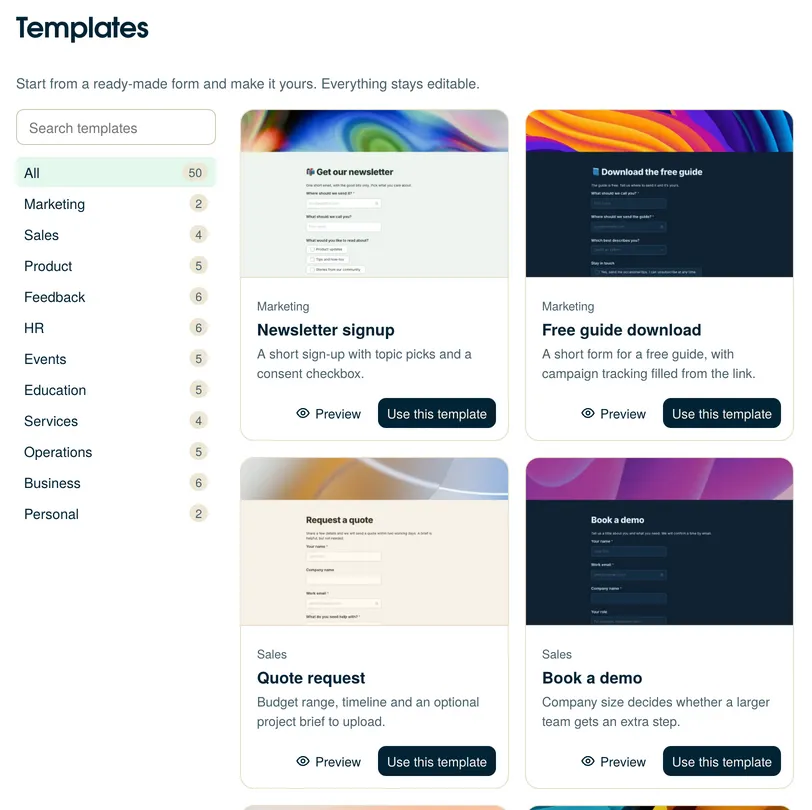
Click Templates in the sidebar. The gallery has 50 templates in 11 categories, from Marketing, Sales and Product to HR, Events and Education. Pick a category on the left, or type in Search templates to find one by name.
You can also open the gallery from a new, empty form: click Use a template under the title.
Preview and use it
- Click Preview on a card to see the whole form before you decide.
- Click Use this template to start a new form from it.
- Change the questions, the design and the settings the way you would on any form, then publish it.
Many templates already use Faddy’s smarter blocks, such as conditional logic that asks a follow-up only for low scores, or hidden fields filled from the link. Open them in the editor to see how they work.