

Multiple choice
A multiple choice question shows every option on the page, so people answer with one click. It works best for short lists, from yes or no to five or six choices.
Add a multiple choice question
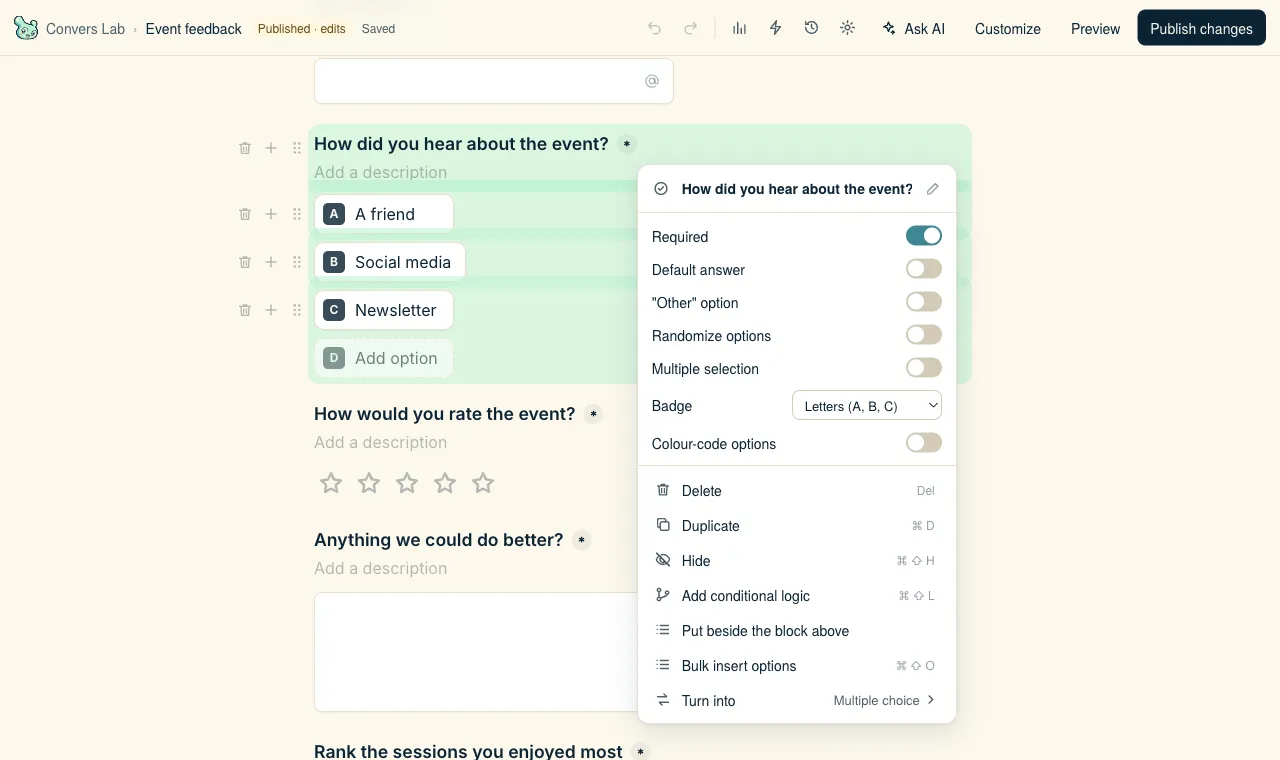
Type /multiple and press Enter. Write the question, then type each option and press Enter for the next one. Click Add option under the list to add more later.
Settings
- Required and Default answer
- “Other” option: adds a last option where people type their own answer.
- Randomize options: shuffles the options for each respondent.
- Multiple selection: lets people choose more than one option.
- Badge: shows letters (A, B, C), numbers (1, 2, 3) or nothing before each option.
- Colour-code options: gives each option its own color.
A multiple choice question is also a good place to start conditional logic: show different questions depending on the option someone picks.