

Input blocks
Input blocks are the questions in your form: anything a respondent fills in, picks or uploads. Add one anywhere on the page by typing / and picking it from the block menu.
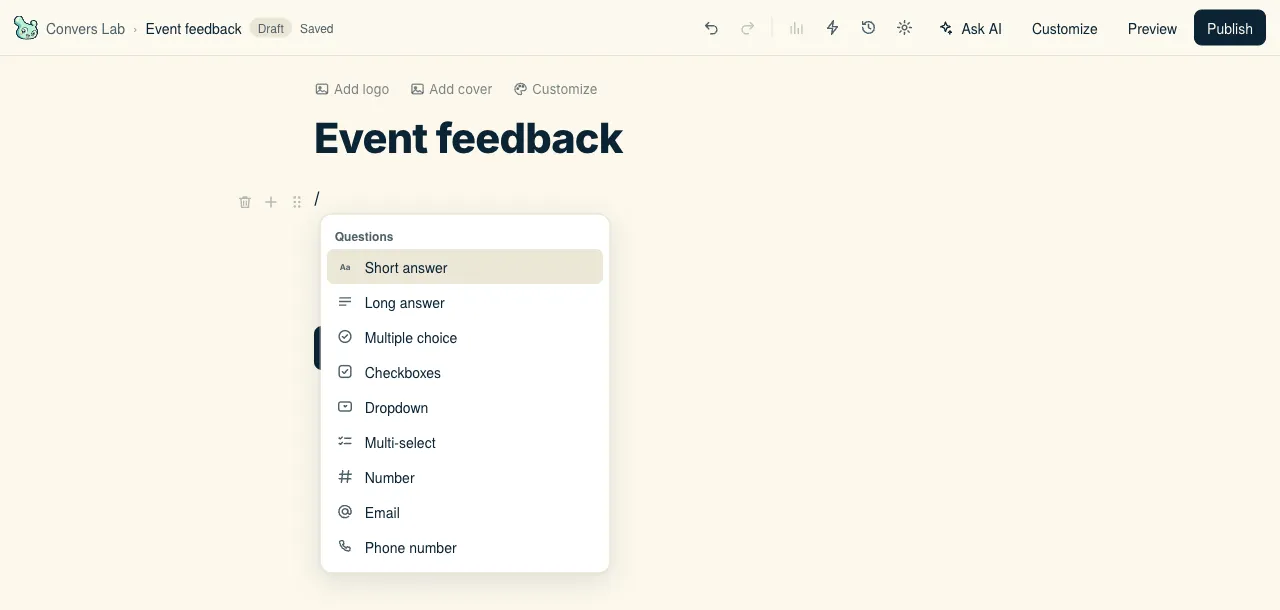
Keep typing after the slash to filter the menu: /date gives you a date question, /sign a signature. Press Enter to add the highlighted block.
Question types
- Short answer and Long answer for text, with a minimum and maximum number of characters
- Multiple choice, Checkboxes, Dropdown and Multi-select for picking from a list
- Number, Email, Phone number and Link, for answers in a set format
- File upload, Date and Time
- Linear scale, Rating, Matrix and Ranking for opinions and priorities
- Signature, drawn with a mouse or a finger
Settings every question shares
Click the arrow next to a question’s title to open its settings. Every question can be Required, which also shows a * next to its title, and most can have a Default answer. The same menu lets you duplicate (⌘ D), hide (⌘ ⇧ H) or delete a question, add conditional logic (⌘ ⇧ L), or Turn into another type without retyping it.
To put two questions side by side, choose Put beside the block above.