

Form settings
Form settings control how your form behaves once it’s live: what respondents see, who gets told about new responses and who can answer at all. Open them from the settings icon in the editor’s top bar, or the Settings tab on the form’s page.
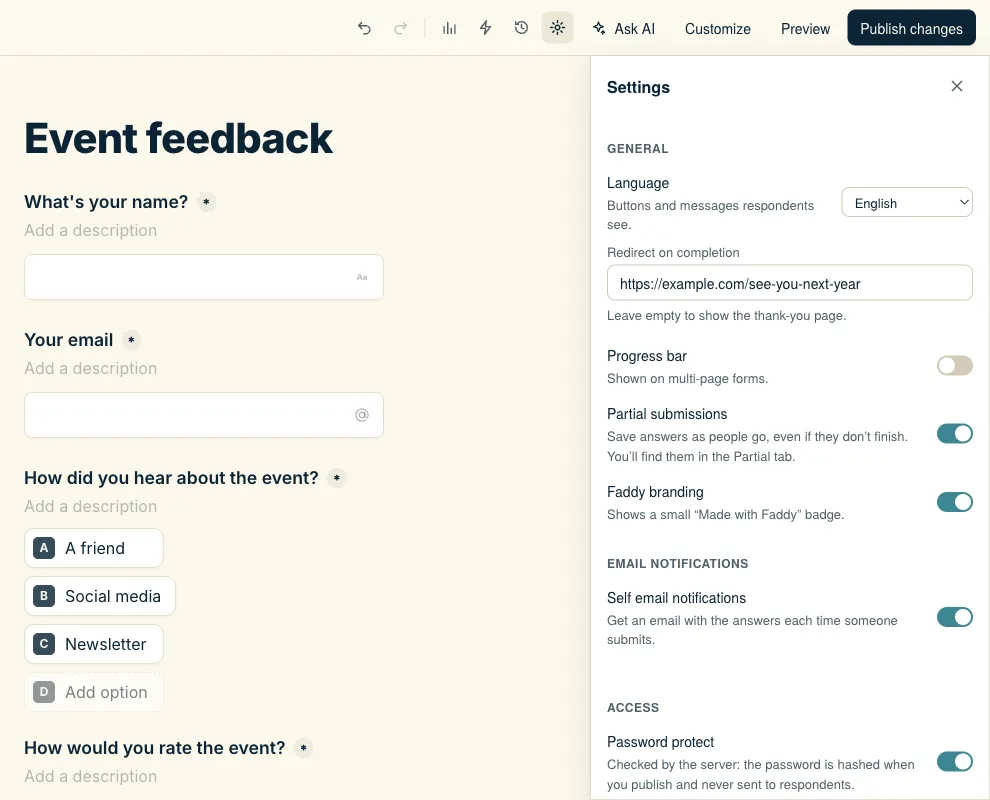
General
- Language: the language of the buttons and messages respondents see: English, Español, Français or Deutsch.
- Redirect on completion: send people to a link when they submit.
- Progress bar: shows how far along people are, on forms with more than one page.
- Partial submissions: keep answers from people who don’t finish.
- Faddy branding: the small “Made with Faddy” badge.
Email notifications
- Self email notifications: get an email with the answers each time someone submits.
Access
- Password protect: only people with the password can open the form.
- Close form: stop accepting responses now.
- Close on a scheduled date: stop accepting responses on a day you choose.
- Limit number of submissions: close the form after a set number of responses. Faddy shows how many it has received so far.
- Closed form message: what people see once the form is closed.
- Prevent duplicate submissions: one response per person.
Behaviour
- Auto-jump to next page: on pages with a single choice, rating or scale question, move on as soon as people answer.
- Save answers for later: keep answers in the respondent’s browser, so they can close the tab and finish another time.