

Customize your form
Every Faddy form can match your brand. Click Customize at the top right of the editor to open the panel, and every change shows on the form as you make it.
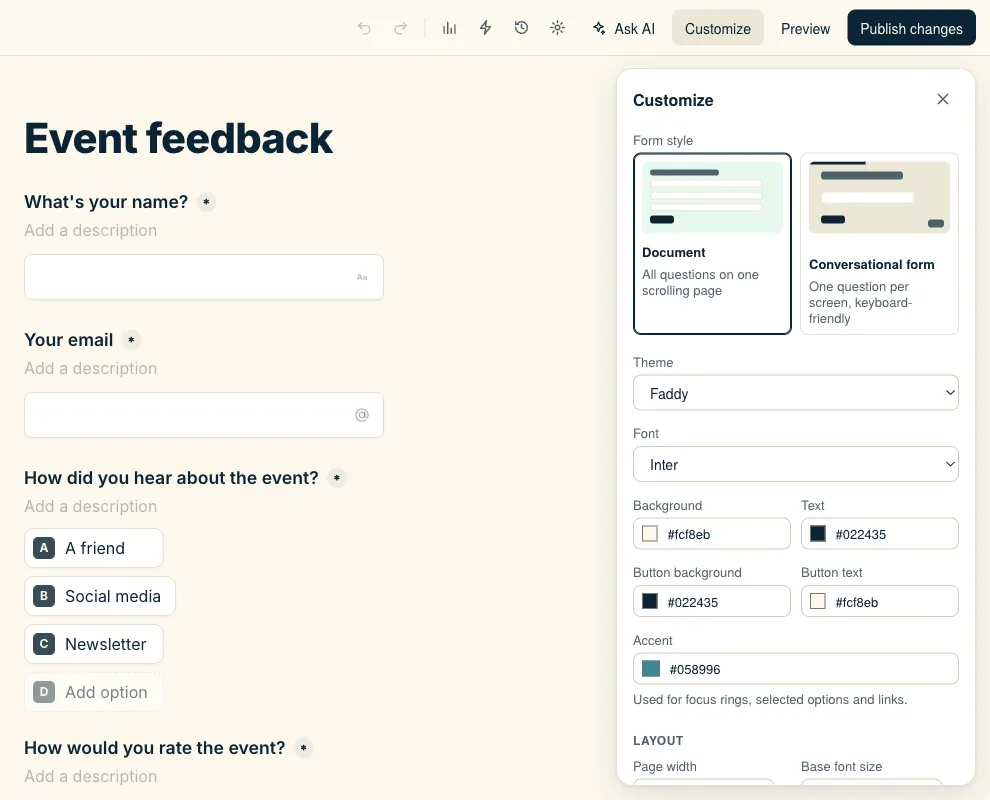
Form style
- Document: every question on one scrolling page.
- Conversational form: one question per screen, easy to answer with a keyboard.
Theme, font and colours
Start from a theme, Faddy, Light, Dark, Sand, Forest or Ocean, then change what you like:
- Font: Inter, System UI, DM Sans, Space Grotesk, Lora, Georgia or JetBrains Mono.
- Background, Text, Button background and Button text colours.
- Accent: the colour of focus rings, selected options and links.
Layout, logo and cover
- Layout: page width and base font size.
- Logo & cover: upload a logo or paste its link, then set its size and corner radius; add a cover image and its height. You can also hover over the form title and click Add logo or Add cover.
- Inputs: background, border, corner radius and width, from Small to Full width.
- Buttons: corner radius and alignment.
For anything the panel doesn’t cover, add custom CSS. Changed your mind? Reset to default theme at the bottom of the panel starts over.